Gemini Rank Tracking: How to Track Your Brand in Gemini
How to track brand mentions in Gemini answers, why there is no GeminiBot to unblock, and how Gemini differs from AI Overviews and AI Mode.
 ChatGPT
 Claude
 Perplexity
 Grok
GrokOn this page
Gemini rank tracking means measuring how often Google's Gemini assistant names, recommends, and cites your brand when buyers ask questions in your category. The mechanics differ from every other engine in one useful way: there is no GeminiBot to unblock, no separate crawl to court, and no Gemini-specific index to submit to. If Google Search can find you, and you have not opted out through Google-Extended, Gemini can ground an answer on you. Everything after that is sampling discipline.
Gemini answers from Google's index
When Gemini needs current information, it grounds the answer in Google Search results and shows links to the pages it used. There is no dedicated Gemini crawler in Google's published crawler list. The token teams sometimes mistake for one, Google-Extended, is a robots.txt token with no crawler or user agent of its own. Google's crawler documentation says it controls two things: whether your content trains future Gemini models, and whether it is used for grounding in the Gemini app and in Grounding with Google Search on Vertex AI. Blocking it therefore keeps your pages out of the answers Gemini grounds in search. It does not touch Google Search: Google says the token "does not impact a site's inclusion in Google Search nor is it used as a ranking signal", so AI Overviews and AI Mode, which run on the Search index, are unaffected. Deindexing from Google Search removes you from all three.
The practical consequence is that your eligibility layer for Gemini is ordinary Google indexing, the thing your team has managed for years. Google's own AI features documentation says the same about its search surfaces: no special markup, no AI-specific files, just crawlable and indexable pages. Before you evaluate any Gemini tracking tool, confirm the pages you want cited are indexed, because a tracker pointed at an unindexed site reports zero and always will.
One brand, three Google surfaces
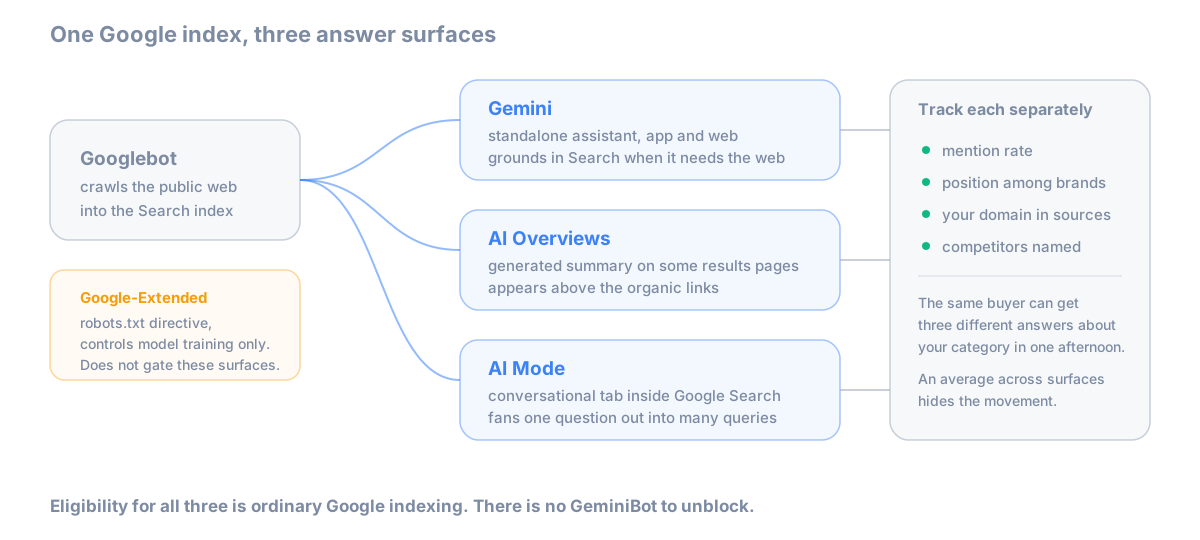
Gemini is not AI Overviews, and neither of them is AI Mode. Gemini is Google's standalone assistant with its own app and site; AI Overviews and AI Mode are surfaces inside Google Search. All three draw on the same index and can give the same buyer three different answers about your category in the same afternoon. Averaging them into one "Google AI visibility" number hides exactly the movement you want to catch, which is why serious tracking reports them as three lines. How the two Search surfaces behave, and how to work on them, is covered in our AI Overviews and AI Mode guide; this article stays with the assistant.
What to measure
Four fields per answer, the same core set as any engine, plus one Gemini-specific column.
Mention rate: the share of runs where Gemini names your brand at all. Position: where you sit among the brands named, because first recommendation and fifth footnote are different outcomes. Citation: whether the grounding links under the answer include your domain, or only third-party pages talking about you. Competitors: who appears on the same runs, scored the same way. The extra column worth keeping for Gemini: whether the answer grounded in search at all. Gemini answers some category questions from the model alone, with no links, and those answers move on a different schedule from grounded ones.
Tracking Gemini by hand
The manual protocol is the same shape as tracking brand mentions in AI search, with two Gemini-specific wrinkles.
- Use 20 to 40 buyer-question prompts, full sentences, kept fixed between runs. Changing the wording changes the measurement.
- Use a clean Google account. Gemini personalizes on account context, and a Workspace account adds your organization's own material to the mix. Measuring from your work account measures your tenant, not what buyers see.
- Start a fresh chat for every run. Conversation history steers later answers.
- Run each prompt five times per window. Identical prompts return different answers run to run, for the reasons in why AI answers change, so single checks are samples rather than rates.
- Fix the market. Answers shift by country and language. Pick your primary market, keep it constant, note it in the sheet.
- Weekly cadence is enough. Gemini's grounded answers move with the index and with model updates rather than hour to hour.
Score the four fields plus the grounded-or-not column, and after two or three weeks you have a defensible mention rate and a trend.
Tools that track Gemini
Gemini is one of the best-covered engines in the category, so the buying question is less which tools list it than how each one samples it: how many runs per prompt, whether grounding links are stored, and whether Gemini is reported separately from Google's Search surfaces.
Citlyze
Citlyze tracks Gemini daily on every plan, from $29/month, scoring mentions, position, citations, and competitor share of voice, with the run count visible behind every rate. Gemini, AI Overviews, and AI Mode are reported as three separate surfaces, so a drop in one does not hide inside an average of the others. The Gemini visibility tracker page shows what a tracked prompt looks like. We build Citlyze, so weigh that disclosure as you read this section.
Rankscale
Rankscale includes Gemini in its engine list from $20/month, the cheapest continuous Gemini tracking available. Sampling is shallower than the mid-range tools, which matters more on Gemini than most engines given the grounded-versus-ungrounded split.
Promptwatch
Promptwatch tracks Gemini alongside a broad model list from $95/month, a reasonable center for agency reporting that needs Gemini as one line among many.
The full field, including tools that bundle Gemini into wider SEO suites, is in best AI rank trackers.
Free Gemini rank tracking
There is no first-party report for Gemini the way Bing Webmaster Tools reports Copilot citations. Search Console reports your Google Search performance, and its AI Mode data arrives folded into overall totals, but nothing in it tells you what the Gemini assistant says about your brand. Free Gemini tracking therefore means the manual protocol above, which costs an afternoon a week for a 20-prompt set, or the trial tiers of the paid tools. Both are legitimate starts; the manual version also teaches you what your buyers actually see, which no dashboard replaces.
Start with the surface split
Run your twenty buyer prompts through Gemini five times each and record two things: what it says about you, and whether it grounded the answer in search. That split decides your next move. Grounded answers point at pages you can influence this quarter; ungrounded ones move only as the model does, and your lever is the wider footprint of what the web says about you. Prefer the sampling to run itself? That is what Citlyze does daily, with the three Google surfaces on separate lines.