Choose which AI crawlers read your WordPress site
AI Crawler Control by Citlyze is a free WordPress plugin. It reads the robots.txt your site actually serves, shows which of 40+ AI crawlers it lets in, and names the plugin, theme or setting behind every block. Then it lets you keep AI training crawlers out while ChatGPT search, Perplexity and other AI answers can still read and cite you.
Free on WordPress.org. No account needed. Works with WordPress 6.4 and later.

See which AI crawlers get in
Reads the robots.txt your site actually serves and marks 40+ AI crawlers allowed or blocked, grouped into AI search, AI assistants and AI training.
Find what blocks them
Names the plugin, theme or setting behind each blocking rule, and flags a robots.txt file that overrides WordPress, Cloudflare's managed robots.txt, and hosts that turn crawlers away before robots.txt is read.
Block AI training, stay in AI search
Keep GPTBot, ClaudeBot and other training crawlers out while OAI-SearchBot and PerplexityBot can still cite you. Preview the exact lines before saving; search engines are never blocked.
Rules for parts of your site
Keep AI training crawlers, or every AI crawler, out of /members/ or other sections while the rest of the site stays open. Search engines are never included.
AI readiness in the editor
Scores each post for AI answers as you write, with the same checks as the Citlyze Chrome extension and AEO grader.
AI suggestions, only when you ask
With an AI provider set up in WordPress 7.0 or later, the editor suggests a question for a heading or a short answer under it. Nothing changes until you click Insert.
Free, and nothing goes to Citlyze
No account needed. The checks run in your WordPress admin and read only your own site. AI suggestions go to your own AI provider, and only when you click.
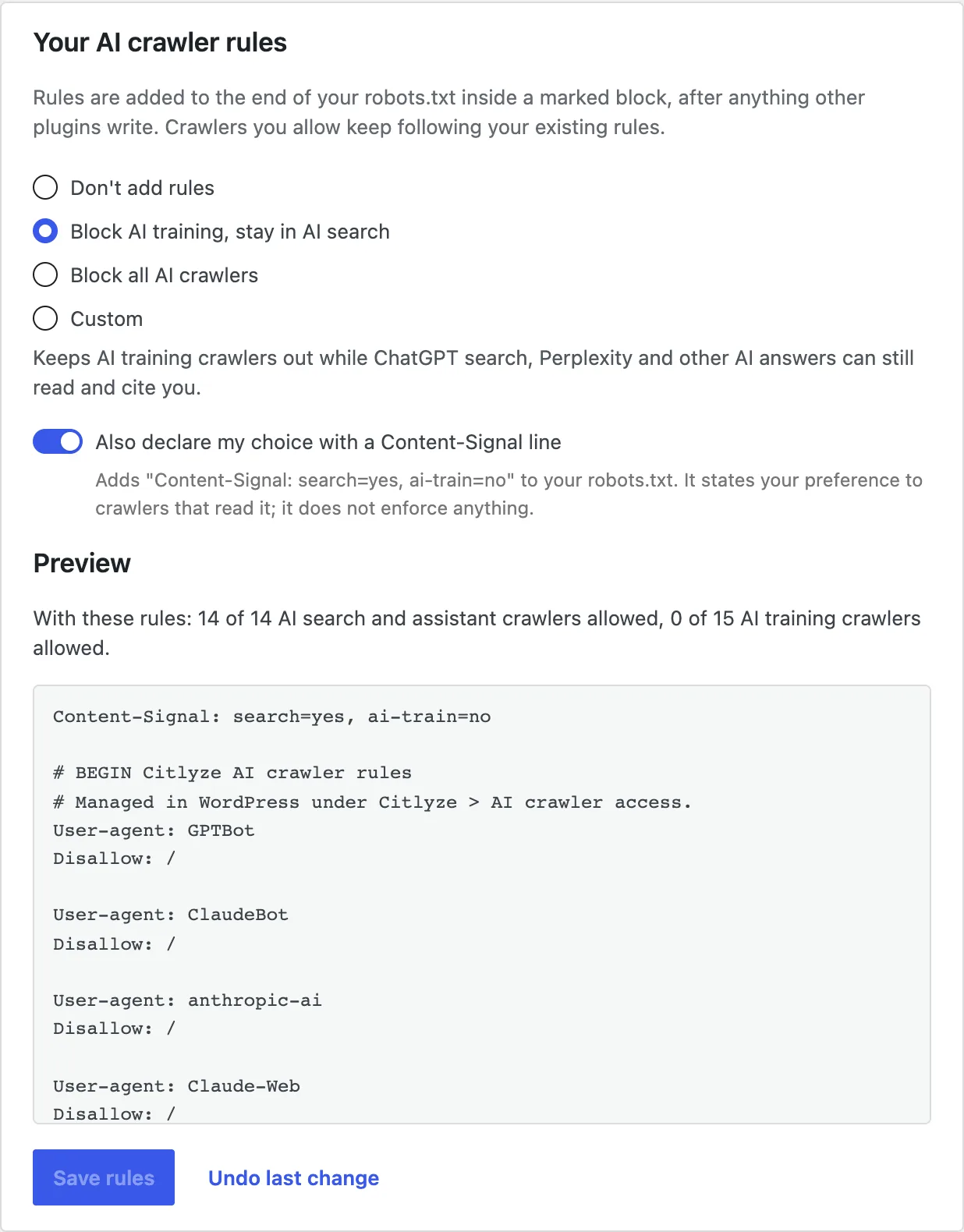
Block GPTBot and AI training crawlers, stay in AI search
OpenAI, Anthropic and Perplexity each run separate crawlers for separate jobs. GPTBot collects training data, OAI-SearchBot builds the index ChatGPT search cites, and ChatGPT-User fetches a page when someone asks about it. Blocking GPTBot keeps your content out of future models. Blocking OAI-SearchBot removes you from ChatGPT search answers, which is rarely the goal. If you decide to block training, the plugin's training-only choice leaves AI search untouched.

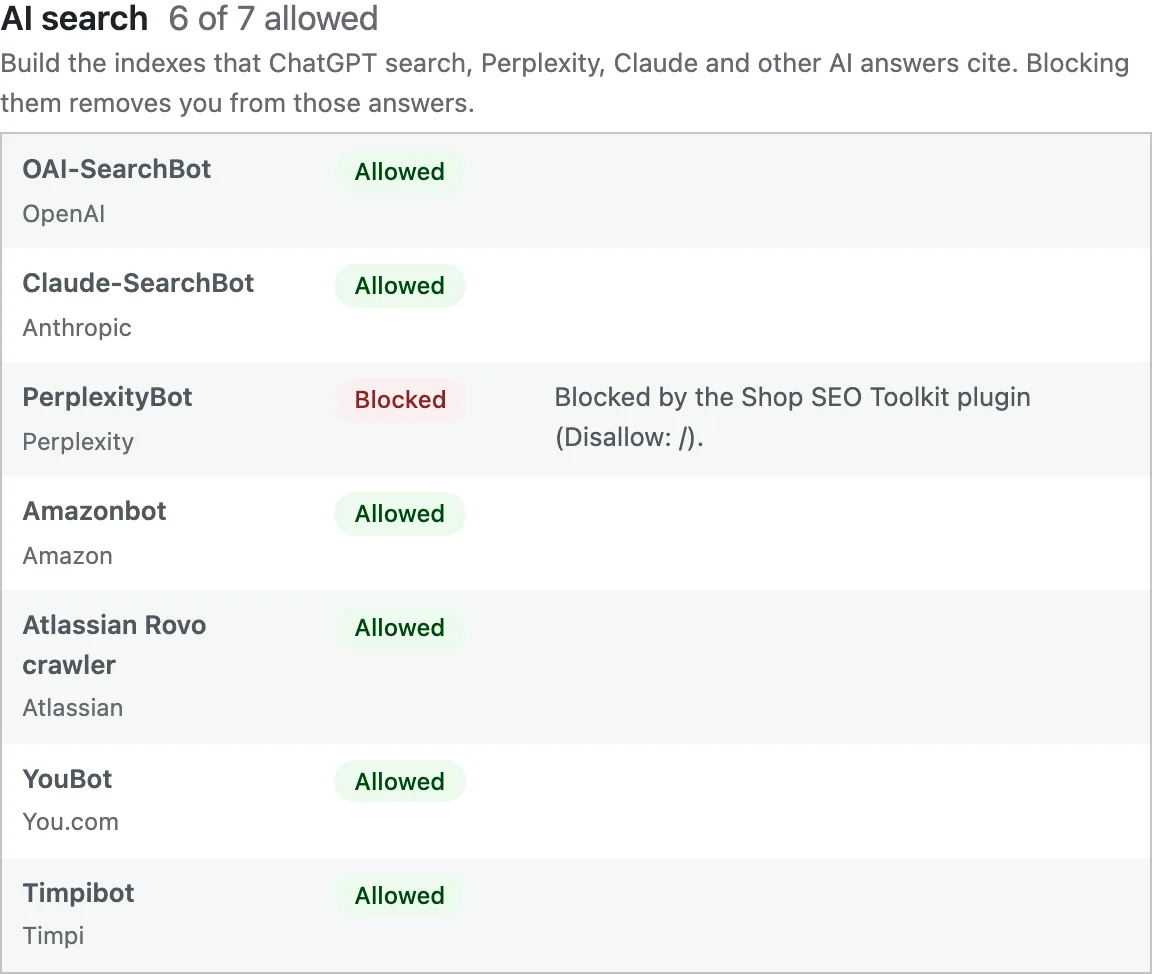
Find the plugin or setting that blocks AI crawlers
A WordPress robots.txt is assembled on the fly: WordPress writes a few lines, then SEO plugins, security plugins and themes add their own. The plugin runs each contribution on its own, so when a crawler is blocked it can tell you which plugin, theme or setting wrote the rule. It also flags what WordPress cannot see into: a robots.txt file on the server, Cloudflare's managed robots.txt, and hosts that block AI crawlers at the edge.
Install, check, choose
Install it from WordPress.org
Search for AI Crawler Control under Plugins > Add New, or use the button above. No account and no setup.
Open the Citlyze menu
The check runs straight away, against the robots.txt your visitors receive, including anything a cache or CDN changes on the way out.
Choose your AI crawler rules
Pick a preset or choose crawlers one by one, check the preview, and save. Undo puts back your previous choice.
Search engines are never blocked
Googlebot, Bingbot, Applebot and other search engine crawlers are listed but can't be blocked from the plugin, because blocking them removes a site from ordinary search results, not just from AI answers. If another plugin blocks one of them, the check says so first. Google-Extended is handled precisely: it controls Gemini training and grounding in the Gemini app and Vertex AI, not Google Search or AI Overviews.
What robots.txt can't tell you
Robots.txt says what crawlers may read, not what they actually read, and firewalls or CDN bot protection can still turn them away. Connect the plugin to Citlyze to see which AI crawlers really visit, confirmed by where each request came from, and which AI answers send you visitors.
See AI crawler trackingFree web tools for the same job
Checks which AI crawlers your robots.txt allows or blocks, and what each block costs.
Choose which AI crawlers to allow or block and download a ready robots.txt.
Checks an llms.txt line by line against the format spec, by URL or by paste.
Readable is where it starts
The plugin tells you whether AI crawlers can read your site. Citlyze tells you whether ChatGPT, Gemini, Perplexity and Google's AI surfaces actually name and cite you, measured across repeated runs.
Yes. The AI crawler check and the AI crawler rules are free, with no account and no usage cap. A Citlyze account is only needed to track AI crawler visits and visits from AI answers.
Does AI recommend you when buyers ask?
Track how ChatGPT, Gemini, Perplexity, DeepSeek, ByteDance, Grok, Google AI Overview & AI Mode, and Bing Copilot mention, cite, and rank your brand. Review tracked answers and the gaps to close.
No credit card required