Agentic SEO: Audit Your Site With Lighthouse's Agent Checks
Agentic SEO gets your site ready for AI agents that complete tasks. Run Lighthouse's Agentic Browsing audit, read the result, and fix each check.
 ChatGPT
 Claude
 Perplexity
 Grok
GrokOn this page
- What is agentic SEO?
- What does Lighthouse's Agentic Browsing category check?
- How do you run an agentic browsing audit?
- What did the audit find on Google Ads' product page?
- How do you fix each check?
- How does agent readiness connect to crawler access and MCP?
- Should you prioritize agentic SEO now?
- Run it on three pages this week
Agentic SEO is the work of making your site usable by AI agents that open pages and complete tasks for people, such as filling in a form or comparing plans. Chrome now checks this in Lighthouse's Agentic Browsing category. Run it in PageSpeed Insights, see which checks apply to your page, and fix accessibility names and layout shift first.
The category is new, Chrome labels it experimental, and a high score can mean less than it looks. Below: what each check tests, how to run it, what it found on Google Ads' own product page, and how to fix each failure.
What is agentic SEO?
Agentic SEO prepares a site for software that acts on it, where GEO and AEO prepare it to be named in answers. Some vendors use the same term for AI agents that do SEO work for you, such as audits and content briefs; this guide covers the first meaning. An agent reads the page through the browser's accessibility tree, decides which control to use, and clicks or types. If a button has no name, or the layout jumps as the agent clicks, the task can fail.
Interest is rising from a small base. In Ahrefs' study of AI search keyword trends, "agentic seo" was the fastest-growing term in an 18-keyword agentic optimization group, up 5,867%. The group as a whole averaged 541 searches a month and grew 852%, so the absolute numbers are still small.
What does Lighthouse's Agentic Browsing category check?
It runs seven deterministic audits on one page and reports how many of the applicable ones passed, as a fraction such as 2/2 rather than a 0 to 100 score. Chrome announced the category in June 2026 as part of an agent-ready toolkit, and the report itself calls it "still under development and subject to change."
| Audit | What it checks | How to pass |
|---|---|---|
| Accessibility tree is well-formed | 33 accessibility rules that matter to machines, such as names on buttons, links and form fields, valid ARIA and a document title | Give every interactive element a programmatic name |
| Cumulative Layout Shift | Whether elements move after the page renders, which causes misclicks | Keep CLS at 0.1 or below |
| WebMCP form coverage | Forms missing WebMCP toolname and tooldescription attributes | Annotate forms (informational, no warning) |
| WebMCP tools registered | Lists the WebMCP tools the page registers | Register tools with the imperative API, if you use it |
| WebMCP schemas are valid | Errors in registered tool schemas | Fix the schema errors the browser reports |
| llms.txt follows recommendations | Server errors when fetching /llms.txt; a 404 counts as not applicable | Serve a valid file, or none |
| ai-catalog.json schema is valid | The agent resource manifest, if you publish one | Match the Agentic Resource Discovery spec |
The accessibility audit bundles 33 rules from Lighthouse's existing accessibility checks. The audit source lists them, from button-name and link-name to label and aria-required-attr.
The category moved fast, so check which version produced your report. Lighthouse's release notes show it arriving in versions 13.2 and 13.3 in May 2026, switched off for the PageSpeed Insights API in 13.4.0, back on in 13.4.1 in July, and extended in 13.5.0 in September with the ai-catalog.json check. The category's ID in the Lighthouse config is agentic-browsing.
Google has not said this category affects Search ranking. Treat it as a diagnostic.
How do you run an agentic browsing audit?
PageSpeed Insights is the quickest route: no install, and it runs mobile and desktop together.
- Open PageSpeed Insights and paste the URL of one page, then select Analyze.
- Wait for the lab report. The field data at the top comes from real users; the Lighthouse categories come below it.
- Find the Agentic Browsing score. It sits next to Performance, Accessibility, Best Practices and SEO, shown as a fraction.
- Expand every group. Read the Passed, Failed and Not applicable lists. The fraction only counts audits that applied.
- Check the Lighthouse version. It is printed under the metrics, for example "Emulated Moto G Power with Lighthouse 13.5.0". Older versions show fewer checks.
- Repeat on each template. Run your home page, pricing page, a product page and every page with a form. Agents act on forms, so form pages tell you the most.
- Automate it later. The Lighthouse CLI accepts
--only-categories=agentic-browsing, and Chrome's DevTools Lighthouse panel carries the category from Chrome 150.
Lighthouse checks whether an agent can use a page once it loads. It does not tell you whether AI crawlers are allowed to fetch the page in the first place. That half is what the free AI crawler access checker tests: enter a URL and it shows which of 44 AI crawlers your robots.txt lets in, and which rule blocks the rest.
What did the audit find on Google Ads' product page?
It scored 2/2 on mobile and desktop, and five of the seven checks did not apply. We ran PageSpeed Insights on business.google.com/us/google-ads/, the US version of the product page that ads.google.com redirects to, on October 10, 2026. PageSpeed Insights used Lighthouse 13.5.0.
| Audit | Mobile | Desktop |
|---|---|---|
| Accessibility tree is well-formed | Pass | Pass |
| Cumulative Layout Shift | Pass (0.035) | Pass (0.043) |
| WebMCP form coverage | Not applicable | Not applicable |
| WebMCP tools registered | Not applicable | Not applicable |
| WebMCP schemas are valid | Not applicable | Not applicable |
| llms.txt follows recommendations | Not applicable | Not applicable |
| ai-catalog.json schema is valid | Not applicable | Not applicable |
| Agentic Browsing | 2/2 | 2/2 |
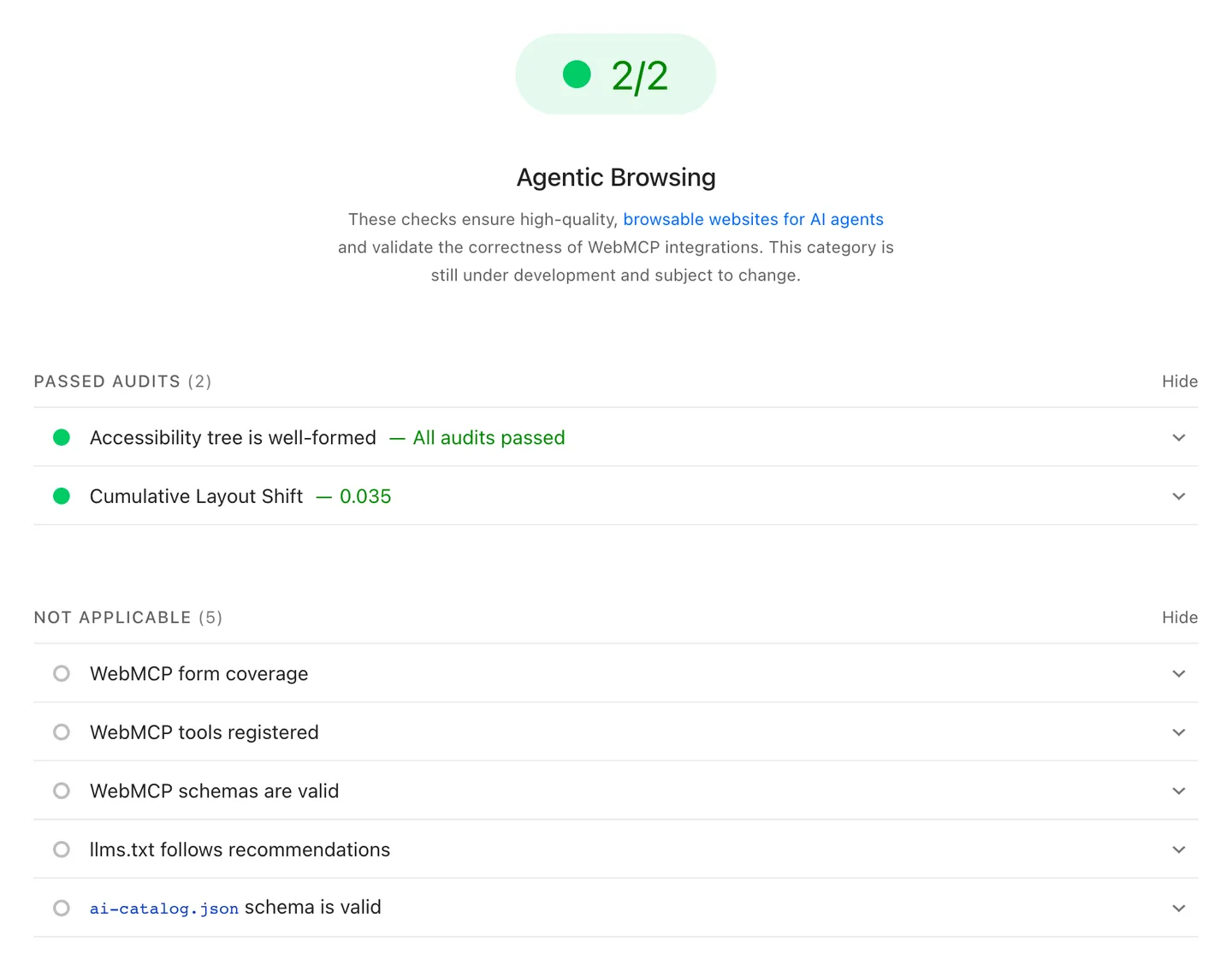
We checked why the five did not apply. The HTML the page serves contains no <form> element, so the form audit had nothing to cover, and the page registers no WebMCP tools. Requests for /llms.txt and /.well-known/ai-catalog.json on business.google.com both returned 404 when we tested them the same day, and Lighthouse treats a missing file as not applicable.
The result shows how to read the fraction. A 2/2 here means the page passed the two checks that apply to a marketing page with no forms. A sign-up page with a form would have been judged on WebMCP coverage as well. The same page scored 41 for mobile performance, which this category does not consider.
This is one page, one run, on one date. It tells you how the audit behaves, not how agent-ready Google's sites are in general.
How do you fix each check?
Fix the two scored checks first, because they also help human visitors. The WebMCP and discovery checks are optional and built on proposed standards.
Accessibility tree
Give every interactive element a name a machine can read. Use a <label> for each input, visible text or aria-label for icon-only buttons, and descriptive link text. Remove ARIA attributes that conflict with the element's role. Lighthouse's Accessibility category runs the same rules and shows the failing elements, so start there.
Layout shift
Web.dev defines good CLS as 0.1 or less at the 75th percentile, and lists the usual causes: images and videos without dimensions, fonts that render at a different size from their fallback, ads and widgets that resize themselves, and content injected above what the user already sees. Set width and height on media, reserve space for embeds and banners, and animate with CSS transform instead of changing size or position properties.
WebMCP form coverage
WebMCP is a proposed standard for exposing a site's actions to AI agents as structured tools. Chrome's WebMCP documentation puts it in an origin trial from Chrome 149. The form coverage audit wants three attributes:
<form toolname="request_demo" tooldescription="Books a product demo with the sales team">
  <input name="work_email" type="email" toolparamdescription="The visitor's work email address">
  <input name="company_size" type="number" toolparamdescription="Number of employees at the company">
  <button type="submit">Request a demo</button>
</form>
Chrome says the audit is informational and raises no warning, so treat it as optional until agents you care about use WebMCP.
WebMCP tools and schemas
These apply only if you register tools in JavaScript. Fix any schema errors the browser reports; the tools stay limited to same-origin contexts unless you allow them in an iframe.
llms.txt
A missing file is not applicable; a server error at that path is what Lighthouse flags. If you publish one, follow the llmstxt.org format. Whether the file helps AI visibility is a separate question, covered in does llms.txt work, and our check of 1,000 published files shows how often generated ones break the format.
ai-catalog.json
This check matters only if you publish agentic resources such as an MCP server. Note a naming gap: the Agentic Resource Discovery spec, a proposal at version 0.91 dated August 26, 2026, now uses /.well-known/ard.json and treats ai-catalog.json as the older path. Lighthouse 13.5.0 still names the audit after the older file.
How does agent readiness connect to crawler access and MCP?
They are three separate doors, and an agent needs a different one depending on how it works. Crawler access decides whether an AI system can fetch your page at all. Agent readiness decides whether a browser agent can use it. MCP lets an assistant call your service without loading a page.
| Layer | Who uses it | What controls it | How to check |
|---|---|---|---|
| Crawler access | Search crawlers and assistant fetchers, such as OAI-SearchBot or ChatGPT-User | robots.txt, CDN and firewall bot rules | AI crawler access checker, server logs |
| Agent readiness | Agents that operate a browser on a user's behalf | Accessibility tree, layout stability, WebMCP | Lighthouse Agentic Browsing |
| Tool access | Assistants that call services directly | MCP servers, listed in an ARD manifest | ARD spec, your MCP client |
A failure at the first layer hides the other two. The GEO audit guide walks through access, robots, rendering and structure in order, and the AI crawler guide lists which bots do which job.
Should you prioritize agentic SEO now?
Prioritize the two scored checks now and the rest when there is evidence of use. Accessible names and stable layouts help every visitor and every assistive technology, so the work pays off even if agent traffic stays small. WebMCP and ARD are proposals in origin trial or draft, and no public data yet shows how many agents use them or how often an agent picks one site over another.
What we do not know is worth stating. Chrome has not published which production agents read WebMCP. Google has not linked the category to rankings. And Lighthouse audits one page per run, so a site-wide view means running each template yourself.
Run it on three pages this week
Pick your home page, your pricing page and your main form page. Run each through PageSpeed Insights, note the fraction and every not-applicable result, and fix any failing accessibility name or layout shift you find. Then check the layer underneath with the free AI crawler access checker: an agent-ready page that AI crawlers cannot fetch will not be read in the first place.